A tablet can be a simple entertainment device, a portable work tool, a study companion, a digital notebook, a home control screen, or a lightweight replacement for a laptop. The challenge is that many tablets look similar at first glance. They have bright screens, thin bodies, app stores, cameras, and familiar brand names. The real differences appear only when you think about how the device will be used every day.
Choosing the right tablet is not about buying the newest model automatically. It is about matching the device to your habits. A student who takes handwritten notes needs something different from a restaurant owner using tablets for menus. A designer needs different features from a parent buying a shared family tablet. A traveler may care most about battery life and weight, while a business user may need security, keyboard support, and reliable video calls.
A better tablet purchase starts with a simple question: what job should this device do most often? Once that answer is clear, screen size, storage, accessories, operating system, and price become much easier to evaluate.
Start With the Main Use Case
The first mistake many buyers make is comparing tablets only by specifications. Processor speed, screen resolution, and camera quality matter, but they do not matter equally to everyone. A tablet used mainly for reading does not need the same power as a tablet used for video editing. A tablet used at a reception desk does not need the same portability as one carried on flights.
For work, look for a tablet with strong multitasking, keyboard support, reliable app compatibility, and enough storage for documents. For study, pay attention to stylus performance, note-taking apps, battery life, and screen comfort. For entertainment, speakers, display quality, storage, and streaming app support become more important.
For public or business use, durability and security may matter more than raw performance. A tablet used as a kiosk, menu, sign-in station, or customer feedback screen should be easy to mount, lock, charge, and manage. In that case, the right accessory setup may be just as important as the tablet itself.
Choose the Right Screen Size
Screen size affects comfort more than many people expect. A small tablet is easier to hold, carry, and use while standing. A larger tablet is better for drawing, split-screen work, video calls, reading documents, and using a keyboard case. The right size depends on whether the tablet will spend more time in your hand, on a desk, or mounted in one place.
An 8-inch tablet can be useful for reading, travel, quick browsing, and point-of-sale tasks. A 10- or 11-inch tablet is often the most balanced choice for general use. It is large enough for video, browsing, documents, and note-taking, but still portable. A 12-inch or larger tablet is better for users who want a laptop-like experience, especially with a keyboard and stylus.
Bigger is not always better. A large tablet can feel awkward on a sofa, heavy during travel, and unnecessary for basic tasks. A smaller tablet can feel cramped when typing, editing spreadsheets, or attending long video meetings. Think about where the tablet will physically be used, not only what it can technically do.
Compare Tablet Sizes by Use
| Tablet Size | Good For | Possible Limitation |
| 8 inches | Reading, travel, kids, simple browsing, handheld use | Limited space for multitasking and typing |
| 10-11 inches | General use, study, streaming, light work, note-taking | May not replace a laptop for heavy tasks |
| 12 inches and above | Drawing, business work, split screen, keyboard use | Heavier, more expensive, less comfortable to hold |
| Mounted tablet | Kiosks, smart home control, menus, check-in stations | Less flexible for personal portable use |
Think About Battery Life in Real Conditions
Battery life claims can be confusing because they are usually based on controlled testing. Real use is different. Brightness, video calls, gaming, navigation, Bluetooth accessories, background apps, and weak Wi-Fi can all reduce battery life.
For students and mobile workers, a tablet should last through a full day of normal use without constant charging anxiety. For travelers, long standby time and fast charging can be valuable. For home use, battery life may be less important if the tablet usually stays near a charger.
For mounted or business tablets, power planning is essential. A tablet used as a kiosk, reception screen, or restaurant menu should not rely on someone remembering to charge it. It may need a permanent charging setup, cable management, or a case that allows clean power access while keeping the device secure.
Storage Matters More Than It Seems
Many people underestimate storage. A tablet with low storage may seem affordable at first, but it can become frustrating after a few months. Apps, system updates, photos, videos, downloaded files, offline shows, games, and note-taking documents can fill space quickly.
For basic browsing, email, and streaming, lower storage may be enough. For students, creators, frequent travelers, or families sharing one device, more storage is usually safer. If the tablet does not support expandable storage, the decision becomes even more important.
Cloud storage can help, but it does not replace local storage completely. You may still need offline access during flights, commutes, classes, conferences, or areas with weak internet. A tablet should have enough space for the files and apps you actually use, not just enough to work on the first day.

Operating System Affects the Whole Experience
The choice between iPadOS, Android, Windows, or another platform affects apps, accessories, updates, security, and how well the tablet works with other devices. Users who already own an iPhone, Mac, or Apple Watch may prefer an iPad because the ecosystem feels smooth. Users who rely on Google services or want more hardware variety may prefer Android. Users who need desktop-style software may consider Windows tablets.
The operating system also affects long-term value. A tablet with strong software support may remain useful for years. A cheaper device with limited updates may become slow, less secure, or incompatible with newer apps sooner than expected.
For families, app controls and parental settings matter. For businesses, device management and security policies may be more important. For students, the availability of note-taking, reading, and collaboration apps can shape the entire experience.
Do Not Ignore Accessories
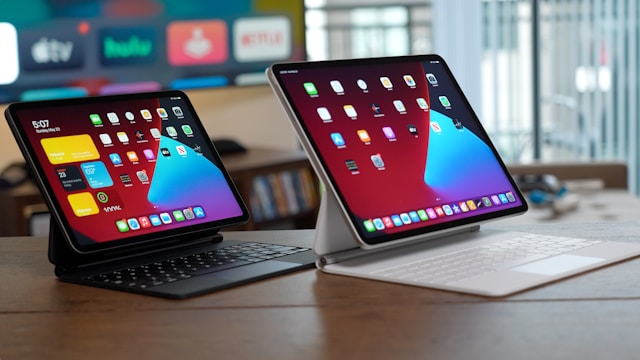
Accessories can transform a tablet. A keyboard case can make it useful for writing and email. A stylus can turn it into a notebook or drawing tool. A protective case can make it safer for children or fieldwork. A stand can improve video calls and desk use. A secure enclosure can make it suitable for public or commercial environments.
However, accessories also add cost. A tablet that seems affordable may become expensive after adding a keyboard, stylus, case, screen protector, charger, and mount. It is better to calculate the full setup before buying.
For business use, accessories should be chosen with durability in mind. A tablet used by customers, employees, or visitors will face more wear than a personal device. Mounting, locking, charging, and cleaning should all be part of the plan.
Security Is Part of Daily Use
Tablet security is not only for business users. Personal tablets often contain email, banking apps, photos, passwords, messages, documents, and cloud accounts. A lost or unlocked tablet can expose more information than people expect.
At a minimum, users should enable a strong passcode, biometric unlocking, automatic updates, device tracking, and backup options. For shared family tablets, separate profiles or content restrictions may be useful. For business tablets, stronger controls may be needed, especially if customers interact with the device.
A tablet used in public should be physically secure as well. A device placed at a counter, booth, reception area, or event stand should not be easy to remove. In these cases, a lockable enclosure or mounted stand is not just an accessory. It is part of the security strategy.
Check Comfort Before Buying
A tablet should feel comfortable in real use. Weight, edge shape, screen brightness, speaker position, keyboard angle, and stylus feel all matter. If possible, test the device in person before buying. Hold it with one hand. Try typing. Check whether the screen reflects light too strongly. See if the size feels right for reading or writing.
Comfort is especially important for long sessions. A tablet used for study, drawing, work, or video calls should not create hand strain, neck strain, or constant adjustment. Sometimes a slightly smaller or lighter model is more useful than a larger one with better specifications.
For mounted tablets, comfort means something different. The screen should be positioned at a good height, with a clear viewing angle and enough space around it. If customers or staff will use it repeatedly, the setup should feel natural and easy to reach.
Match the Tablet to the Future, Not Only Today
A good tablet should remain useful as needs change. A student may later need a keyboard. A small business may start with one tablet and later use several. A family tablet may become a school device. A personal entertainment tablet may become a travel work device.
This does not mean buying the most expensive model. It means leaving enough room for growth. Choose enough storage, consider accessory support, check software update history, and think about whether the tablet can handle more than one role.
A tablet is most valuable when it fits naturally into daily life. It should not feel like a compromise every time you use it. The right device makes common tasks easier: reading, writing, watching, presenting, learning, communicating, controlling smart home devices, or helping customers interact with a business.
Make the Decision Practical
The right tablet is the one that matches your real habits, not the one with the longest specification sheet. Start with the main use case, choose a comfortable screen size, check battery life, select enough storage, compare operating systems, and include accessories in the budget.
For casual users, a balanced mid-size tablet may be enough. For students, stylus support and battery life are often essential. For professionals, keyboard support, storage, and multitasking matter more. For business and public use, security, mounting, and power access should guide the decision.
A tablet can be a flexible tool when chosen carefully. It can support work, study, entertainment, customer service, travel, and home management. The key is to think beyond the device itself and plan the full setup around how it will actually be used.